
Mandatory Profile Completion and Document Verification for Upperclass Students (Year II & Above)
The Office of the Registrar hereby issues an official directive to all continuing undergraduate students currently enrolled in Year II, Year III, Year IV, and Clinical Years across all faculties and academic departments, including:
Faculty of Medical Sciences (Doctor of Medicine — Pre-clinical & Clinical Years as well as Interns, B.Sc. in Medical Laboratory Science)
Faculty of Social Sciences & Humanities (B.A. in Social Work)
In accordance with institutional accreditation standards, National Higher Education Quality Assurance guidelines, and national identification integration requirements, all upperclass students must immediately log into the ECUSTA Student Information Portal to review, update, and complete their official institutional profile records.
How to Access the Portal
Students must access the official university portal using their designated institutional single sign-on credentials:
- Navigate to the student portal at: portal.ecu.edu.et
- Click the primary "SIGN IN WITH COMPUTING ACCOUNT" button (highlighted below) using your official
@ecu.edu.etor@ecusta-hli.edu.etGoogle Workspace credentials. - Upon successful sign-in, navigate to Profile Settings / Document Verification to review your personal data and upload your credentials.
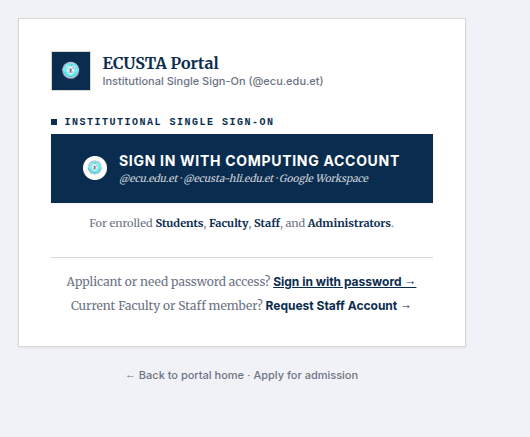
Note: Do not attempt to create a separate guest account or sign in with personal external emails. You must use your assigned institutional computing account.
Mandatory Documents Required for Upload
Every upperclass student must upload clear, legible digital scans or high-resolution files (PDF - max file size 5MB per document) of the following records:
1. Recent Passport-size Photograph:\
A clear, recent, front-facing portrait photograph with a plain white or light background. Snapshots, filtered photos, side-angles, or casual selfie images will be automatically rejected. (JPG/PNG is acceptable)
2. National ID / Fayda Digital ID (Front & Back):\
A clear scan or photograph of both the front and back of your official Ethiopian National ID (Fayda Card) or valid government-issued identification card, clearly displaying your legal name, photograph, and unique identification number.
3. Grade 12 ESSLCE Certificate / Official Result Slip:\
Your official Ethiopian Secondary School Leaving Certificate Examination (ESSLCE) certificate or authenticated national examination result slip showing all subjects and scores.
4. Official High School Transcript (Grades 9–12):\
A complete, authenticated high school transcript covering all academic years from Grade 9 through Grade 12, stamped by the issuing secondary school.
5. Collegiate / University Transfer Transcript (Mandatory for Transfer Students):\
For students admitted via collegiate transfer or advanced standing, an official official academic transcript and course exemption letters issued by your previous accredited institution of higher education must be uploaded.
6. Remedical Certificate (Mandatory for remedial students)\
If applicable
7. Degree & Student Copy (Mandatory for degree holding students)\
If applicable
Critical Notice: Portal Access & Registration Restrictions
Students are advised to treat this directive with the utmost urgency. The following administrative restrictions are actively enforced:
Course Registration Disallowed: Course registration, semester enrollment, examination admission tickets, and clinical clerkship/hospital rotation scheduling are strictly disallowed and locked for any student whose profile documentation remains incomplete or unverified.
Portal Access Suspension: Student portal accounts may be temporarily disabled or suspended if the required documents are not submitted within the designated verification window.
Graduation & Licensure Dossier: Completed verified documentation is a prerequisite for subsequent clinical attachments, national licensure examinations, and formal degree clearance.
Technical Support & Contact Details
If you experience issues logging into your Google Workspace computing account, require password resets, or need assistance uploading your documentation:
Office of the Registrar: Main Academic Campus
Registrar Inquiries: registrar@ecu.edu.et or info@ecu.edu.et
IT & Computing Account Helpdesk: itsupport@ecu.edu.et
Telephone Assistance: +251 (0) 913 23 93 92
Office of the Registrar
ECUSTA Higher Learning Institute (ECUSTA-HLI)*